
Description
OMNIBUS F4 V2 PRO Flight Controller – LOFTY AGROTECH
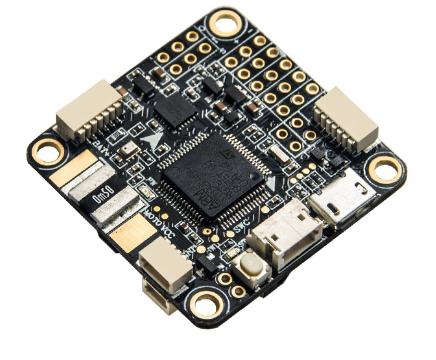
The OMNIBUS F4 V2 PRO Flight Controller is a next-generation flight controller designed for professional FPV pilots and drone enthusiasts who demand precision, speed, and reliability. Manufactured by LOFTY AGROTECH, this flight controller is based on the popular Omnibus F3 Pro but upgraded with the STM32F405 processor, offering faster loop times, improved flight stability, and advanced telemetry features. Whether you are building a racing drone, freestyle FPV quadcopter, or a heavy-lift drone, the OMNIBUS F4 V2 PRO Flight Controller is built to handle high-performance requirements.
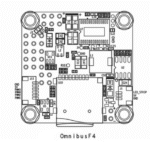
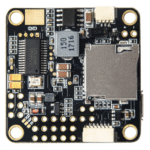
Overview of the OMNIBUS F4 V2 PRO Flight Controller
The OMNIBUS F4 V2 PRO Flight Controller is a versatile, high-performance board designed to meet the demanding requirements of modern drone pilots. It features a 32-bit STM32F405 microprocessor, which provides ample processing power for rapid PID loop computation, advanced sensor integration, and real-time telemetry.
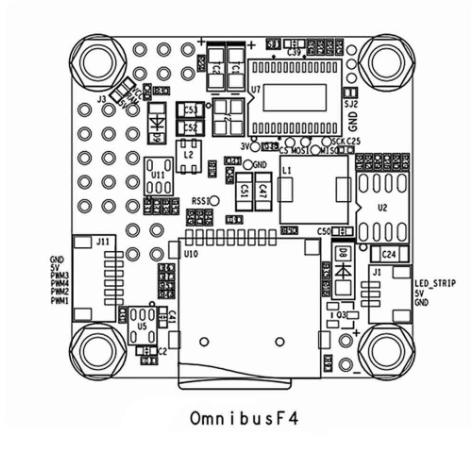
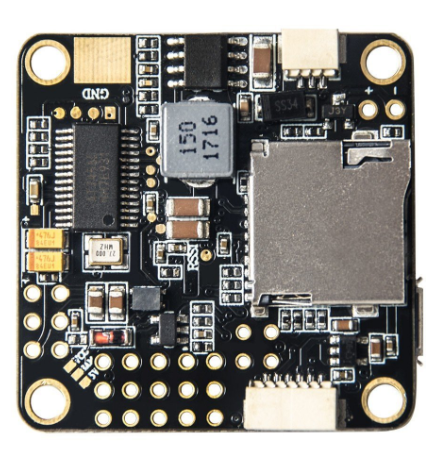
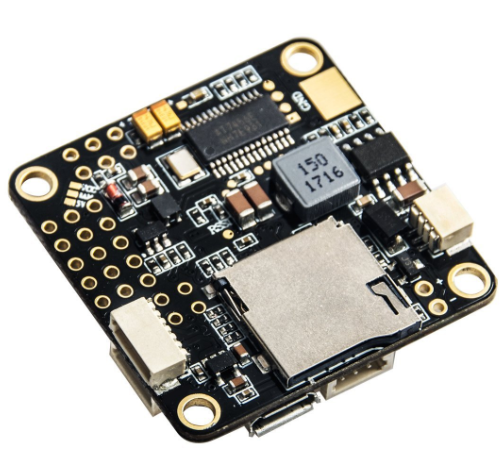
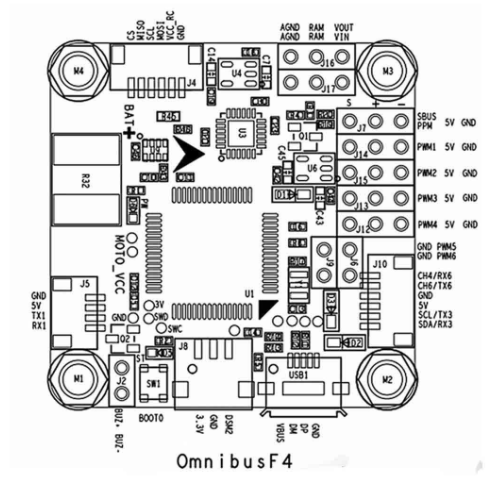
This flight controller integrates multiple functions in a compact 37x37mm form factor, including an onboard BetaFlight OSD, BEC power supply, current and voltage sensor, MPU6000 gyro & accelerometer, BMP280 barometer, and a micro SD card slot for data logging. The OMNIBUS F4 V2 PRO Flight Controller is compatible with both SBUS and PPM receiver inputs, making it suitable for a wide range of RC systems.
By using this flight controller, pilots can experience smoother flight performance, faster response to stick inputs, and enhanced stability during aggressive maneuvers. The OMNIBUS F4 V2 PRO Flight Controller is especially popular among FPV racers, freestyle pilots, and DIY drone enthusiasts.
Key Features of OMNIBUS F4 V2 PRO Flight Controller
STM32F405 32-Bit Processor
At the heart of the OMNIBUS F4 V2 PRO Flight Controller is the STM32F405 processor, a powerful 32-bit MCU that delivers ultra-fast loop times and high-performance flight stabilization. This processor allows for precise calculation of PID loops and sensor fusion, enabling the drone to respond instantly to pilot commands.
With its ample memory and processing power, the STM32F405 supports advanced flight modes, telemetry, and OSD functionality, making it ideal for professional FPV applications. Pilots using the OMNIBUS F4 V2 PRO Flight Controller can enjoy minimal latency, smooth flight, and reliable performance even in challenging conditions.
Built-In BetaFlight OSD
The built-in BetaFlight OSD (On-Screen Display) is a standout feature of the OMNIBUS F4 V2 PRO Flight Controller. It allows pilots to view real-time flight data directly on their FPV goggles or monitor, including battery voltage, current draw, flight time, and PID settings.
The OSD can be easily configured via BetaFlight software and supports in-flight PID tuning, making it an indispensable tool for FPV pilots. With the OMNIBUS F4 V2 PRO Flight Controller, you can manage all key flight parameters without needing an external display or laptop.
Onboard Battery Elimination Circuit (BEC)
The OMNIBUS F4 V2 PRO Flight Controller includes a built-in Battery Elimination Circuit (BEC), which converts the voltage from your main LiPo battery to 5V, providing stable power to the flight controller, camera, and video transmitter.
This eliminates the need for a separate 5V battery or external BEC module, reducing weight and complexity. The onboard BEC supports up to 3A current and can handle LiPo batteries from 2S to 4S, ensuring reliable performance for a wide range of drones.
High-Precision Sensors
The OMNIBUS F4 V2 PRO Flight Controller features the MPU6000 SPI gyroscope and accelerometer for accurate orientation detection and flight stabilization. Combined with the BMP280 barometer, this setup allows for precise altitude hold and smooth flight even in turbulent conditions.
The onboard current and voltage sensor enables real-time monitoring of battery performance, helping pilots prevent over-discharge and maintain optimal flight safety.
Micro SD Card Slot for Data Logging
A micro SD card slot is integrated into the OMNIBUS F4 V2 PRO Flight Controller, enabling full flight data logging. Pilots can record telemetry, sensor data, and flight performance metrics for post-flight analysis and tuning.
This feature is essential for competitive FPV racing or testing new PID settings, as it allows pilots to analyze performance trends and make informed adjustments to improve flight efficiency.
Receiver Compatibility and Inputs
The OMNIBUS F4 V2 PRO Flight Controller supports both SBUS and PPM inputs, allowing for flexible receiver configuration. With simple GUI setup in BetaFlight, pilots can enable RX_serial, assign UART ports, and select the appropriate input type for their receiver.
This ensures compatibility with a wide range of RC systems and makes the flight controller highly versatile for different drone setups.
Technical Specifications of OMNIBUS F4 V2 PRO Flight Controller
The OMNIBUS F4 V2 PRO Flight Controller is engineered for high performance and precision, offering a combination of advanced hardware, integrated sensors, and comprehensive connectivity. Understanding the technical specifications is essential for pilots and drone builders to maximize its capabilities and ensure compatibility with their drone setups.
Processor – STM32F405 32-bit MCU
At the core of the OMNIBUS F4 V2 PRO Flight Controller is the STM32F405 32-bit microcontroller unit (MCU). This powerful processor enables:
- Ultra-fast loop times: Ensuring responsive and stable flight, even during high-speed maneuvers.
- Advanced sensor fusion: Combines input from the gyroscope, accelerometer, and barometer to maintain precise orientation.
- Efficient PID computation: Handles complex PID calculations for smooth and accurate control of the drone.
This processor allows pilots to experience minimal latency and enhanced control for both FPV racing and freestyle applications.
Sensor Suite
The flight controller features a high-precision sensor suite for accurate flight stabilization and telemetry:
- MPU6000 SPI Gyro & Accelerometer: Detects angular velocity and acceleration on three axes, ensuring precise orientation and control.
- BMP280 Barometer: Provides altitude data for reliable altitude hold and smoother flight in variable conditions.
- Built-in Current & Voltage Sensor: Monitors real-time power consumption and battery health, allowing safer and more efficient operation.
Together, these sensors allow pilots to maintain stable and responsive flight, even in challenging environments.
Size and Weight
The compact dimensions of 37 x 37 x 5 mm and lightweight 18 g design make the OMNIBUS F4 V2 PRO Flight Controller suitable for a variety of drone builds, including:
- Mini quads and micro drones where space is limited.
- Freestyle drones that benefit from a lightweight setup.
- Heavy-lift drones where maintaining balance and weight distribution is critical.
Its small footprint does not compromise functionality, allowing all key features to be integrated without increasing size or weight.
Power Supply – Onboard BEC
The OMNIBUS F4 V2 PRO Flight Controller includes an onboard 5V/3A Battery Elimination Circuit (BEC), providing stable power to the flight controller, FPV camera, and video transmitter.
- Supports 2S to 4S LiPo batteries, ensuring flexibility across different drone setups.
- Eliminates the need for a separate 5V power module, simplifying wiring and reducing overall drone weight.
- Protects sensitive electronics from voltage fluctuations by delivering a regulated 5V output.
This makes the flight controller reliable for both lightweight and heavy-load applications.
Receiver Input Compatibility
The OMNIBUS F4 V2 PRO Flight Controller supports:
- SBUS input: For modern digital receivers with fast response times.
- PPM input: For traditional analog or legacy RC systems.
This wide compatibility ensures that pilots can use virtually any standard RC receiver, providing flexibility when upgrading or customizing drones.
Micro SD Card Slot
A built-in micro SD card slot allows for full-flight data logging:
- Records telemetry and sensor data for post-flight analysis.
- Supports PID tuning refinement and performance optimization.
- Enables advanced flight analysis for competitive FPV racing or educational purposes.
Logging flight data improves understanding of drone behavior, making tuning and troubleshooting easier.
On-Screen Display (OSD)
The built-in BetaFlight OSD delivers real-time telemetry information directly to FPV goggles or monitors:
- Displays battery voltage, current draw, flight time, and PID values.
- Supports in-flight PID tuning for optimized performance.
- Compatible with popular FPV transmitters like Wolfwhoop Q1/Q3/Q1-Pro.
This feature reduces reliance on external devices while providing essential data for safer and more efficient flying.
Firmware
The OMNIBUS F4 V2 PRO Flight Controller comes preloaded with:
- BetaFlight 3.1.7_OMNIBUSF4SD firmware, providing:
- Advanced flight modes
- Telemetry support
- Full OSD configuration
- Compatibility with a wide range of ESCs, receivers, and FPV equipment
Pilots can update to the latest BetaFlight versions to unlock new features and improve flight performance.
Connectors
The flight controller is equipped with 3 Burg connectors, simplifying wiring and ensuring reliable connections for:
- Receiver inputs
- ESCs
- Telemetry and peripheral devices
These connectors improve the efficiency of the build process and provide secure, stable connections during flight.
Summary of Key Technical Specifications
| Specification | Details |
|---|---|
| Processor | STM32F405 32-bit MCU |
| Sensors | MPU6000 SPI gyro & accelerometer, BMP280 barometer, built-in current & voltage sensor |
| Flight Controller Size | 37 x 37 x 5 mm |
| Weight | 18 g |
| Power Supply | 5V/3A onboard BEC (supports 2S–4S LiPo) |
| Receiver Input | SBUS/PPM |
| Micro SD Card Slot | Yes |
| OSD | Built-in BetaFlight OSD |
| Firmware | BetaFlight 3.1.7_OMNIBUSF4SD |
| Connectors | 3 x Burg connectors |
This comprehensive technical specification section highlights the OMNIBUS F4 V2 PRO Flight Controller’s performance, compact design, and versatility, making it a perfect choice for FPV racers, freestyle pilots, mini drones, and heavy-lift drones.
Advantages of Using OMNIBUS F4 V2 PRO Flight Controller
The OMNIBUS F4 V2 PRO Flight Controller by LOFTY AGROTECH is designed to provide pilots with superior performance, reliability, and versatility. Its combination of a powerful STM32F405 processor, onboard sensors, BEC, OSD, and data logging makes it a complete solution for modern FPV drones and quadcopters. Below are the key advantages that set this flight controller apart from older F3 models and other competitors.
Faster Loop Times for Responsive Flight
The STM32F405 32-bit processor in the OMNIBUS F4 V2 PRO Flight Controller enables significantly faster loop times compared to older F3 flight controllers. This faster processing allows the FC to compute PID loops, sensor fusion, and stabilization commands more rapidly, resulting in smoother and more precise flight performance.
Benefits of faster loop times:
- Improved Responsiveness: The drone reacts instantly to stick inputs, which is crucial for FPV racing and freestyle flying.
- Enhanced Stability: Rapid processing of gyro and accelerometer data ensures stable flight even in aggressive maneuvers or turbulent conditions.
- Better PID Tuning: Faster loops allow finer PID adjustments, making it easier to achieve the perfect balance between stability and agility.
For pilots who demand high-speed responsiveness, the OMNIBUS F4 V2 PRO Flight Controller delivers superior control and confidence during both competitive racing and complex aerial stunts.
All-In-One Functionality
One of the standout advantages of the OMNIBUS F4 V2 PRO Flight Controller is its all-in-one design. By integrating the BetaFlight OSD, BEC, MPU6000 gyro & accelerometer, BMP280 barometer, current/voltage monitoring, and micro SD logging into a single board, it simplifies the drone build process.
Key benefits of all-in-one functionality:
- Reduced Weight: Eliminates the need for multiple separate modules, reducing the overall weight of the drone.
- Simplified Wiring: Fewer wires and connections mean a cleaner build, less chance of errors, and easier maintenance.
- Compact Design: Perfect for mini quads and freestyle builds where space is limited.
This integration allows pilots to enjoy a lightweight, high-functioning flight controller that provides all the necessary features without adding complexity or bulk.
Real-Time Telemetry and PID Tuning
The built-in BetaFlight OSD and current/voltage monitoring features of the OMNIBUS F4 V2 PRO Flight Controller enable real-time flight telemetry and in-flight adjustments. Pilots can monitor battery voltage, current draw, flight time, and PID settings directly through their FPV goggles or monitors.
Advantages of real-time telemetry:
- In-Flight PID Tuning: Adjust PID settings during flight without needing a laptop connection, ensuring optimal flight performance.
- Battery Health Monitoring: Prevent over-discharge and monitor current draw to protect both the battery and FC electronics.
- Enhanced Safety: Pilots receive immediate feedback on potential issues such as voltage drops or abnormal current consumption.
This functionality is invaluable for both FPV racers and freestyle pilots, allowing them to maximize performance while maintaining safe and reliable operation.
Versatility Across Drone Applications
The OMNIBUS F4 V2 PRO Flight Controller is highly versatile, suitable for almost any quadcopter configuration. Its powerful processor, compact design, and integrated features make it ideal for:
- FPV Racing Drones: Fast loop times and real-time telemetry improve responsiveness and control.
- Freestyle Quads: Smooth stabilization and in-flight PID adjustments enhance aerial tricks and maneuvers.
- Mini Drones: Compact size and lightweight design make it perfect for small-frame quads without sacrificing performance.
- Heavy-Lift Drones: Onboard BEC and current monitoring ensure reliable operation under heavy payloads, such as cameras or sensors.
This versatility makes the OMNIBUS F4 V2 PRO Flight Controller an excellent choice for both professional pilots and hobbyists seeking a single, reliable flight controller for multiple drone applications.
Additional Advantages
- Durability and Reliability: The board is designed to withstand vibrations and high-speed flight conditions.
- Ease of Setup: Compatible with BetaFlight software, enabling straightforward configuration and sensor calibration.
- Future-Proof: Supports firmware updates, ensuring continued compatibility with new features and peripherals.
- Data Logging: Micro SD slot allows logging of flight metrics for post-flight analysis and tuning.
Installation and Setup of OMNIBUS F4 V2 PRO Flight Controller
Proper installation and setup of the OMNIBUS F4 V2 PRO Flight Controller are critical to ensure optimal performance, safe operation, and long-term reliability. This section provides step-by-step guidance for mounting, wiring, and configuring the flight controller for FPV drones, freestyle quads, and other applications.
Mounting the Flight Controller
Mounting the flight controller correctly is the first step toward achieving stable and precise flight. The OMNIBUS F4 V2 PRO Flight Controller comes in a compact 37 x 37 mm form factor, but its high-performance sensors (MPU6000 gyro and accelerometer) are sensitive to vibration and mechanical interference.
Mounting tips:
- Clean and Level Surface: Ensure the mounting surface is free of debris, dust, or uneven areas. A flat, vibration-free surface provides the most accurate sensor readings.
- Use Anti-Vibration Mounts: If possible, install the FC using soft rubber or silicone mounting pads. These reduce vibrations from motors and propellers, protecting the MPU6000 sensor and enhancing flight stability.
- Avoid Short Circuits: Double-check all solder joints and wiring before powering the board. Dense solder points on the OMNIBUS F4 V2 PRO Flight Controller can cause short circuits if misaligned. Inspect each connection carefully to avoid damage during installation.
- Orientation: Ensure the flight controller is oriented correctly relative to the front of the drone. Most FCs have a marked forward direction; aligning it properly is crucial for accurate PID performance and OSD orientation.
Proper mounting reduces sensor errors, vibration-induced drift, and enhances the overall flight experience.
Connecting Power and Receivers
Power and receiver connections are the next critical step for a safe and functional drone build. The OMNIBUS F4 V2 PRO Flight Controller includes an onboard 5V/3A Battery Elimination Circuit (BEC), allowing it to be powered directly from your LiPo battery.
Connection steps:
- Connect LiPo Battery to BEC: Use a LiPo battery within the supported range (2S–4S). Exceeding this voltage range can damage the flight controller and connected peripherals. Connect the positive and negative leads securely to the BEC input.
- SBUS/PPM Receiver Wiring: Connect the receiver signal, power, and ground wires to the corresponding pins on the FC. The OMNIBUS F4 V2 PRO supports both SBUS and PPM inputs, giving flexibility for various RC systems.
- Verify Connections: After wiring, double-check the polarity, pin alignment, and solder joints to prevent accidental shorts or reversed connections.
Following these steps ensures stable power delivery to the FC and reliable communication with your receiver, which is essential for precise control during flight.
Configuring BetaFlight OSD
The BetaFlight On-Screen Display (OSD) allows pilots to monitor telemetry data directly through FPV goggles or monitors. Proper configuration is essential for real-time monitoring of flight parameters such as voltage, current, and PID settings.
Configuration steps:
- Install BetaFlight Configurator: Download and install the latest BetaFlight Configurator on your PC. Connect the OMNIBUS F4 V2 PRO Flight Controller via USB.
- Enable OSD: Navigate to the “OSD” tab in BetaFlight Configurator and enable the OSD feature. Select the telemetry data you want to display, such as battery voltage, current, flight time, RSSI, and PID parameters.
- Sensor Calibration: Calibrate the accelerometer and gyro through the BetaFlight GUI to ensure accurate orientation and stabilization. Place the drone on a level surface for precise calibration.
- Save Settings and Test: After configuration, save the settings and reboot the flight controller. Conduct a bench test to verify that the OSD displays all chosen telemetry correctly before flight.
Proper BetaFlight OSD setup ensures that pilots have all critical flight data in real time, improving safety, control, and flight performance.
Additional Installation Tips
- Cable Management: Route wires carefully to avoid interference with propellers and moving parts. Use zip ties or cable sleeves to secure loose wires.
- Vibration Minimization: Avoid mounting the FC near high-vibration components without damping materials.
- Firmware Update: Before first flight, ensure the OMNIBUS F4 V2 PRO FC has the latest BetaFlight firmware installed. This ensures compatibility with peripherals and access to the newest features.
- Pre-Flight Checks: Always perform a pre-flight inspection after installation to verify sensor calibration, OSD display, and power stability.
Tips for Maximizing Performance of OMNIBUS F4 V2 PRO Flight Controller
The OMNIBUS F4 V2 PRO Flight Controller is a high-performance flight controller designed for FPV racing, freestyle, and professional drone applications. To fully harness its capabilities, pilots should follow these essential tips to optimize performance, maintain reliability, and ensure safety.
Firmware Updates
Keeping your BetaFlight firmware up to date is one of the most important steps for maximizing performance. Firmware updates often include:
- Bug fixes and stability improvements
- Enhanced flight performance and faster loop times
- New features for OSD, telemetry, and PID tuning
- Compatibility improvements with ESCs, receivers, and sensors
With the OMNIBUS F4 V2 PRO Flight Controller, using the latest firmware ensures that the STM32F405 processor operates at peak efficiency, and all onboard sensors, including MPU6000 and BMP280, provide accurate readings. Regular updates also help avoid unexpected crashes and software conflicts during flight.
Sensor Calibration
Accurate sensor calibration is crucial for smooth and stable flight. The OMNIBUS F4 V2 PRO Flight Controller comes with the MPU6000 gyro and accelerometer, which need periodic calibration to maintain precise orientation and stabilization.
Calibration tips:
- Calibrate the accelerometer while the drone is on a level surface.
- Ensure the gyro is properly aligned and free from vibration.
- Recalibrate after firmware updates or after installing new components like motors or ESCs.
Proper calibration improves flight accuracy, reduces drift, and ensures responsive control during aggressive maneuvers, FPV racing, and freestyle tricks.
OSD Customization
The BetaFlight On-Screen Display (OSD) is one of the most powerful features of the OMNIBUS F4 V2 PRO Flight Controller. Pilots can customize which telemetry data is displayed to maintain a clean and informative FPV feed.
Tips for OSD optimization:
- Display only essential data such as battery voltage, current draw, flight time, and PID status.
- Avoid cluttering the screen with unnecessary metrics, which can distract during high-speed maneuvers.
- Reposition elements on the screen for better visibility, especially in mini or freestyle drones.
Proper OSD customization ensures that pilots can monitor critical flight parameters in real-time without losing focus on piloting.
Current Monitoring
Monitoring real-time current draw is vital to prevent battery over-discharge, especially during high-speed flights or heavy-lift operations. The OMNIBUS F4 V2 PRO Flight Controller has a built-in current sensor, which allows pilots to track power consumption via the OSD or telemetry feed.
Practical tips:
- Set current limits in BetaFlight to trigger alarms when approaching unsafe levels.
- Monitor peak current during aggressive throttle maneuvers to avoid overloading the BEC or ESCs.
- Use logged current data to analyze battery performance and predict flight time accurately.
By actively monitoring current, pilots can protect their LiPo batteries and prevent mid-flight power failures.
Check Soldering and Connections
The OMNIBUS F4 V2 PRO Flight Controller has a dense solder layout, which makes proper soldering critical for reliable operation. Poor connections can lead to short circuits, intermittent sensor failures, or total FC malfunction.
Soldering tips:
- Inspect all solder joints under good lighting or with a magnifier before powering the FC.
- Reflow or touch up any suspicious joints to ensure clean and solid connections.
- Avoid excessive solder, which can create bridges between pins and cause short circuits.
Additionally, verify all connectors and wiring harnesses, including SBUS/PPM inputs, camera, and VTX connections, to maintain stable communication and power delivery.
Additional Tips for Optimized Performance
- Vibration Reduction: Use soft mounting pads to minimize vibration affecting the MPU6000 sensor.
- ESC Calibration: Calibrate ESCs regularly to ensure smooth throttle response.
- Battery Care: Use high-quality LiPo batteries within the supported voltage range (2S–4S).
- Pre-Flight Check: Always perform a pre-flight inspection to verify all sensors, OSD data, and power connections.
- Data Logging: Utilize the micro SD card for logging flight performance metrics to improve PID tuning and optimize flight stability.
By following these tips, pilots can fully exploit the advanced features of the OMNIBUS F4 V2 PRO Flight Controller, achieving precise control, safer flights, and consistent high performance in any drone application.
Common Issues and Troubleshooting for OMNIBUS F4 V2 PRO Flight Controller
Even the most advanced flight controllers can face occasional issues due to setup, wiring, or configuration errors. The OMNIBUS F4 V2 PRO Flight Controller is highly reliable, but understanding common issues and how to troubleshoot them ensures smooth and safe flight.
PPM Receiver Not Recognized
One of the most common issues pilots face is when the flight controller does not recognize the PPM receiver. This typically occurs due to incorrect configuration or inactive UART ports. To resolve this issue:
- Enable RX_serial in BetaFlight GUI – Launch BetaFlight Configurator on your PC, navigate to the “Ports” tab, and enable RX_serial on the UART port connected to your receiver. This allows the FC to communicate with the PPM receiver.
- Activate the Correct UART Port – By default, most setups use UART3, but confirm the wiring and port assignment in BetaFlight to ensure proper connection.
- Re-select RX_PPM in GUI and Reboot – After enabling RX_serial and assigning the UART, go to the “Configuration” tab, select RX_PPM as the receiver type, save, and reboot the flight controller.
Following these steps ensures your PPM receiver is correctly detected, providing accurate control inputs to the drone.
Tip: Always double-check solder joints on the receiver pins to prevent loose connections or intermittent signal issues.
OSD Not Displaying Data
The BetaFlight OSD is essential for monitoring real-time telemetry, including voltage, current, flight time, and PID values. If the OSD is not displaying data, it can be caused by improper wiring, configuration issues, or outdated firmware.
Troubleshooting steps:
- Verify Connections to VTX and Camera – Ensure the video transmitter and camera are connected to the flight controller correctly. Improper wiring can prevent the OSD overlay from appearing on your FPV feed.
- Enable BetaFlight OSD in Configurator – Open BetaFlight Configurator, go to the “OSD” tab, and confirm that the OSD feature is activated. Customize which telemetry elements you want to display.
- Update Firmware if Necessary – Using outdated firmware can lead to OSD malfunctions. Update to the latest BetaFlight OMNIBUS F4 SD build for optimal compatibility.
Pro Tip: After enabling OSD, perform a bench test before flying to ensure all telemetry data displays correctly. This reduces the risk of mid-flight surprises.
Power Issues
Power-related issues are critical to identify because they can lead to unstable flight or even component failure. The OMNIBUS F4 V2 PRO Flight Controller features a built-in 5V/3A BEC, but improper wiring or battery selection can cause power failures.
Troubleshooting steps:
- Check BEC Output Voltage – Use a multimeter to measure the BEC output. It should consistently provide 5V to the flight controller, camera, and VTX. Fluctuations may indicate a faulty connection or component.
- Ensure LiPo Battery is Within Supported Range (2S–4S) – Using a battery outside the specified range can damage the FC or cause voltage instability. Always check your battery rating before connecting.
- Inspect Dense Solder Joints for Short Circuits – The OMNIBUS F4 V2 PRO has tightly packed solder points. A short circuit caused by solder bridges can prevent proper power delivery. Carefully inspect the board under good lighting and reflow any suspect joints.
Additional Tip: Always power the board on a non-conductive surface during initial testing to prevent accidental shorts. Using a small fuse in your power line can also safeguard against voltage spikes.
Other Common Troubleshooting Tips
- Sensor Calibration Issues: If the drone drifts or tilts unexpectedly, recalibrate the MPU6000 gyro and accelerometer via BetaFlight.
- Firmware Compatibility: Ensure that your ESCs and peripherals are compatible with the latest BetaFlight OMNIBUS F4 SD firmware.
- Heat Management: During long flights, monitor FC temperature; excessive heat may indicate overcurrent or poor ventilation around the board.
By following these troubleshooting tips, pilots can resolve most common issues with the OMNIBUS F4 V2 PRO Flight Controller, ensuring reliable performance and a smooth FPV flying experience.
Applications of OMNIBUS F4 V2 PRO Flight Controller
The OMNIBUS F4 V2 PRO Flight Controller is designed for versatility, making it suitable for a wide range of drone applications. Its powerful STM32F405 processor, onboard BEC, BetaFlight OSD, and high-precision sensors allow it to meet the demands of both recreational and professional pilots. Below are the primary applications where this flight controller excels:
FPV Racing Drones
For FPV racing, split-second responses and precise control are essential. The OMNIBUS F4 V2 PRO Flight Controller offers extremely fast loop times thanks to its 32-bit STM32F405 processor, allowing your drone to react instantly to pilot inputs.
The built-in BetaFlight OSD provides real-time telemetry directly to your FPV goggles, so you can monitor battery voltage, current draw, flight time, and other critical parameters without distraction. This ensures safer, faster, and more controlled flights during competitive racing. Additionally, the accurate MPU6000 gyro and BMP280 barometer stabilize the drone during aggressive turns, flips, and high-speed maneuvers, giving racers an edge over competitors.
Freestyle Quads
Freestyle pilots require smooth stabilization and responsive control to perform complex aerial tricks. With the OMNIBUS F4 V2 PRO Flight Controller, you can rely on precise sensor readings and low-latency PID loops to execute flips, rolls, and dives with confidence.
The built-in OSD enables pilots to make in-flight adjustments to PID settings, which is invaluable when attempting new freestyle maneuvers. Moreover, the compact and lightweight design allows freestyle drones to maintain agility while carrying FPV cameras and video transmitters for immersive recording. This flight controller ensures a balanced combination of power, stability, and tunability essential for freestyle aerial artistry.
Mini Drones
Mini drones, such as 2-inch or 3-inch micro quads, require compact, lightweight, and efficient flight controllers without sacrificing performance. The OMNIBUS F4 V2 PRO Flight Controller fits perfectly into small drone frames due to its 37×37 mm size and 18g weight, making it ideal for mini quads.
Despite its small form factor, it maintains full functionality, including BEC, OSD, current monitoring, and sensor integration. Mini drone pilots can enjoy enhanced flight stability, real-time telemetry, and smooth control for both indoor and outdoor flights. Its lightweight design ensures the drone retains agility while carrying necessary FPV gear.
Heavy-Lift Drones
For drones carrying larger payloads—such as cameras, sensors, or delivery packages—power reliability and flight stability are critical. The OMNIBUS F4 V2 PRO Flight Controller comes with a built-in 5V/3A BEC that can handle high current loads, ensuring consistent power to both the flight controller and connected devices.
The integrated current and voltage monitoring allows pilots to track battery usage in real-time, helping prevent over-discharge and power failures during critical operations. The precise sensors (MPU6000 gyro and BMP280 barometer) stabilize the drone even under heavy weight, enabling reliable flight for photography, mapping, or industrial applications.
Educational & DIY Projects
The OMNIBUS F4 V2 PRO Flight Controller is ideal for students, hobbyists, and DIY enthusiasts looking to explore drone technology. Its easy integration with SBUS/PPM receivers, BetaFlight software, and micro SD logging makes it a perfect learning platform for understanding flight dynamics, PID tuning, and telemetry analysis.
Educators can use this flight controller to demonstrate real-world drone applications, sensor integration, and software configuration. Hobbyists can experiment with custom builds, modifications, or autonomous projects, benefiting from the FC’s versatile capabilities. Its reliable performance, lightweight design, and wide firmware support make it an excellent choice for anyone entering the world of drones.
Why Choose LOFTY AGROTECH for OMNIBUS F4 V2 PRO Flight Controller
LOFTY AGROTECH offers high-quality, reliable, and performance-oriented flight controllers for FPV enthusiasts and drone builders. The OMNIBUS F4 V2 PRO Flight Controller combines cutting-edge hardware with user-friendly firmware support, backed by a trusted brand. By choosing LOFTY AGROTECH, pilots can ensure durability, technical support, and ongoing firmware compatibility for their drone builds.
Package Contents
- 1 x OMNIBUS F4 V2 PRO Flight Controller
- 3 x Burg Connectors
- User manual and wiring guide (digital download available)
Conclusion
The OMNIBUS F4 V2 PRO Flight Controller by LOFTY AGROTECH is an all-in-one flight solution for serious FPV pilots and drone enthusiasts. With its STM32F405 processor, built-in BetaFlight OSD, onboard BEC, MPU6000 & BMP280 sensors, and micro SD card logging, it provides unmatched performance, stability, and control.
Whether for racing, freestyle, mini quad builds, or heavy-lift drones, the OMNIBUS F4 V2 PRO Flight Controller delivers reliability, precision, and versatility. Upgrade your drone today with this powerful flight controller from LOFTY AGROTECH and experience the next level of FPV flight.
Link
 In stock now. Limited quantities available. Ships within 24 hours.
LOOKING FOR MORE? DISCOVER EVERYTHING WITH OFFER AT http://www.loftyagrotech.com
Explore more in our camera drone collection and find the right aerial companion.
Before flying, ensure you’re compliant with India’s drone regulations (DGCA DigitalSky Portal).



Reviews
There are no reviews yet.